powered by ODEO
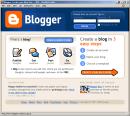 Now that you’ve done some exploring around this website and understand how this program will work, it’s time to setup your very own personal blog to begin recording your thoughts, discoveries and exercises in. For this program, we recommend that you use Blogger*, a popular free online blog hosting service that is extremely easy to use.
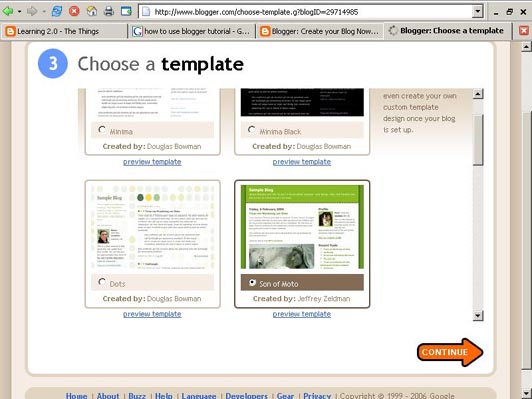
Creating a blog using Blogger takes just three steps:
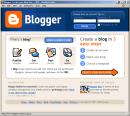 Now that you’ve done some exploring around this website and understand how this program will work, it’s time to setup your very own personal blog to begin recording your thoughts, discoveries and exercises in. For this program, we recommend that you use Blogger*, a popular free online blog hosting service that is extremely easy to use.
Creating a blog using Blogger takes just three steps:
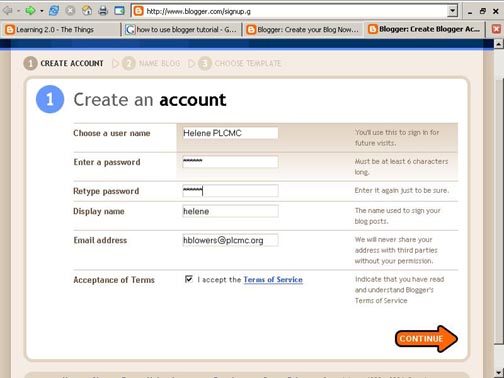
- Create an account (view screenshot)
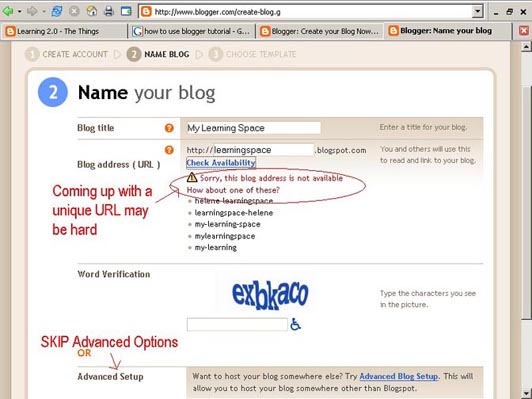
- Name your blog (view screenshot)
- Select your template. (view screenshot)
Once you’ve created your blog here are two important things to know:
- To add posts: The maintenance interface that you will use to add posts, edit or change the step-up your blog is accessed online at http://www.blogger.com/ Be sure to write down your login and password.
- To view your blog: Your blog address is http://(xxxx).blogspot.com, (xxxx)=the unique identifier you entered in Step 2. Be sure to also write down your blog address.
If you run into problems or would like more information about blogs and using Blogger here are some discovery resources you can use:
- Freevlog’s Quicktime Tutorial: Setup a Free Blogger Blog Note: Ignore the opening comments about downloading Firefox if your PC doesn’t have it. This will work in Explorer just fine.
- Blogger’s Quick Tutorial
OK -- Now, it’s your turn...
Discovery Exercise:
- Setup a blog for yourself through Blogger.
- Add a test post or two.
IMPORTANT NOTE: How you choose to identify yourself on your blog is your choice. You can blog under a screen name, anonymously, or as yourself. After you have set up your blog, please send an email to your branch trainer - Paul, Claire or Jacqui -- indicating the name of your blog, and its URL (web site address) Also please let them know if you do not wish your blog to appear among the NVDPL Playground list of participants.
* Use of Blogger is only a recommendation. If there is another blog hosting site that you are more comfortable with, please feel free to use it.


12 comments:
It is unclear from the instructions given how I should register the blog I created. It says to look at #3 above, but the only "#3" on this page refers to selecting a template.
Here's what the instruction says:
IMPORTANT NOTE: How you choose to identify yourself on your blog is your choice. You can blog under a screen name, anonymously, or as yourself. However, in order to qualify for the staff incentives, you will need to register your blog (see #3 above).
Thanks Alison for picking up on that.. have changed the wording
Just checking in...
Hello all, please ignore the highlighted wording quoted by Alison. These instructions have been corrected thus:
IMPORTANT NOTE: How you choose to identify yourself on your blog is your choice. You can blog under a screen name, anonymously, or as yourself. After you have set up your blog, please send an email to your branch trainer - Paul, Claire or Jacqui -- indicating the name of your blog, and its URL (web site address) Also please let them know if you do not wish your blog to appear among the NVDPL Playground list of participants.
It took a while but I finally got thru'. More time will need to be allocated for those really willing to continue.
It seemed somewhat easy to get started. I want to know how to edit my set up page on my blog.
That wasn't so difficult ... off to the playground!
Hey. I put two posts on my own Blog. Obviously, they do not appear here. Did I misunderstand somethinkkkk in the instructions? I guess this was the place meant. Sorry.
This was easier than I thought it would be. Now I just need to edit the layout.
Woohoo!
Wording under "To add a post" is confusing! Or am I just confused?
I have a few blogspot blogs already, so I will refrain from creating another one. Poppy, did you want to change the template or edit the html--you can either one but I am not sure you can change the colours/design of a specific template if you don't know how to edit the html, but I could be wrong about this...
Post a Comment